Imports from Live Blog

Sunday, 30 March 2008

Now Digging, Feeding my Friends and a Facebook App Worth Installing!

OK, just a quick update that serves two purposes:

  1. I've signed up to a couple of new services. And I installed a Facebook application! I can't remember the last time I did that!
  2. I am testing a new Live Writer plug in :)

OK, in an effort to try and organise myself a bit better online, I have finally signed up to the two following services/sites:

digg (http://www.digg.com)
I think digg is a great idea, and since I spend so much time checking out blog posts, I kind of owe it to digg them more, and hopefully one day get some digg's myself :)

Digg also serves as a great hub for finding new content.

FriendFeed (http://friendfeed.com)
Another fantastic site designed to aggregate data from several social networking sources as well as website's. I think key ones here are blogs, twitter, Facebook, LinkedIn and Google Reader. Updates to all of these are then centralised on your personal FriendFeed page. Excellent stuff. Good news is that anyone who is a friend of mine on Facebook doesn't need to check it as you can also add a neat little application to Facebook that broadcasts updates to your news feed and profile. Very, very nicely done!

Special thanks to Loic Le Meur for inspiring me to do it via his blog post!

Friday, 21 March 2008

ASP.NET MVC Framework Source Code Released

For those of you that haven't heard, the ASP.NET MVC source code has been released on CodePlex. This is pretty awesome and, IMO an excellent demonstration of how Microsoft really are taking great steps to becoming much more customer driven. As I said to Scott Hanselman earlier on twitter, exciting times!

Now, I have yet to really get into ASP.NET and Web Applications since I am still working on the Windows element of my MCAD course, but I really look forward to seeing this mature so I can delve into it once I do!

Be sure to check out:

ScottGu's post on it here.
Scott Hanselman's post on it here.

Thursday, 20 March 2008

Vista Network Issue - "Unidentified Network" & Loss of Internet Connectivity


UPDATE: See Items in Red under "Next things to try".

Ohhh Windows Vista baby, you were doing so well!

Right, I logged on to my PC yesterday morning to find I had no Internet connectivity. My first port-of-call? The "Network and Sharing Centre" of course! The nice little graphic on the screen there then proceeded to tell me I was on an "Unidentified Network". "Hmmm, that's odd" I thought.

So, I think "lets fix this damn thing". I run the network diagnosis this to fix it, and I am presented with a dialog telling me that I need to reset my router - I don't really believe this, but what the hell, I reset it anyway. Still no Internet.

Weird, so I then fire up the command prompt "cmd.exe" (with admin privileges) and run "ipconfig /all" to have a look at what's going on. I then see I have been assigned an APIPA address. I know this normally happens when there is a problem communicating with the DHCP server on the router. Now, this never fails on my router, so I figured I would fire up the craptop (my crappy laptop) to see if it works. I was able to connect without any issues both wired (using the same wire as on my desktop to check the cable) and wirelessly, as well as refresh my IP address via DHCP with the laptop. Right, this has just got really interesting, because my craptop is running Windows XP.

So theoretically its not an ISP, Router or cable issue. So it has to be something on my Vista desktop. I then think, "ok, maybe Vista is not liking the DHCP configuration, so I disable the DHCP Client (using "services mmc snap-in") and configure a static IP address (using the same network info from the laptop - other than the actual IP of course). I reboot and confirm the IP address information has been set, via "ipconfig /all" - but, you guessed it, still no Internet.

So, I'm starting to get more confused now. Static IP's nearly almost always work, they can just be a pain in the ass to maintain.

I start thinking maybe Vista Service Pack 1 (SP1) is the issue. I know I had it as an update around the time it all went bad, but I know the Internet has been working fine with it, but I don't care, its not working now, and that's the only change that my system has experienced recently. So, I fired up System Restore (in the "Backup and Restore" Centre), and restored to the point before SP1 was installed. Annnd... No joy (suprise).

I'm now getting increasingly angry and frustrated. I then think that maybe System Restore couldn't replace/fix some of the settings/drivers/lunar alignment/whatever. So I wipe the entire PC and reinstall Vista from scratch. After the setup completes, I know I am back to square one as I have lost everything, but guess what! STILL NO GOD DAMN NETWORK CONNECTIVITY! ARRGGHHHH!

I have tried a few other things following a google of the issue (which showed I am certainly not alone in this)..

So, to summarise:

Things I have tried (to no avail) - mostly in order:

  • Running the "Diagnose" in Network and Sharing Centre.
  • Rebooting the computer, TV, toaster,  light switches, kettle, flooring, walls, house, UK, Europe, Earth and Solar System.
  • Assigning a static IP.
  • DHCP release/renew.
  • System restore to pre-SP1.
  • Disabling IPv6.
  • Clearing the WINSOCK/Ipv4/Ipv6 stacks.
  • Checking the Router's DHCP configuration by using another (XP) computer on the same network (which worked fine).
  • Checking the cabling by using the same cable in the above wired test.
  • Applying the registry fix suggested in the Microsoft Knowledgebase (KB) article 928233.
  • Disabling the second Network Interface Controller (NIC).
  • Putting the computer to sleep and waking it up again.
  • Uninstalling the Network Controllers via device manager and rebooting and letting Vista set them up again.
  • Updating the Network Drivers.
  • Leaving and rejoining the workgroup.
  • Reformat the machine (GOD DAMMIT!).
  • All of the above post-format.
  • Praying and asking for an act of God.

My thoughts based on above:

  • It can't be the router or cable, since both are still working fine with the laptop.
  • It must be something to do with the desktop.
  • I cant see how its a configuration issue since I have completely reformatted the machine.
  • I doubt it's the NIC's because its a week-and-a-half-old computer.

Next things to try (and why):

  • Try a different router. Maybe the NDIS of Vista, or something in Vista has triggered something in the router to reject it and/or Vista has [suddenly] turned against my router (the mutiny!).
    Was unable to try a different router - seems I am missing a connector for my other router, although I doubt this is the problem anyway, since my laptop is working fine! 
  • Try installing XP on the desktop. This will help localise two issues. Is it Vista, or is it the NIC's? If all works fine in XP, then I know its Vista, if not, then I know its likely the NIC's.
    I am relieved in some ways, since installing XP DID NOT fix the issue (I don't want to give up hope on Vista - I REALLY like it!), looks like this really is a hardware failure. When I try to go into the network adapters properties, it seems to take ages to load to (and XP is VERY fast on this rig). Good news, received email back from vendor to arrange return and replacement.
  • Pray some more and reset everything again. What? Every little helps right?

Anyone else had the same issue? Did you manage fix it? How?

Tweet! Tweet! This Geek Finally Gets on Twitter

Well, I finally done it, I have been watching twitter (http://www.twitter.com) for a while now, and been undecided as to wether or not I should sign up. I have now signed up and have it up and running.

Why did I do this?

Well, first off, I read this blog post from Scott Hanselman and it got me thinking. One of my main goals professionally it to try and network with more developers. Its amazing how much good it is doing me working with, and talking to more geek's. I am learning shed-loads, and it's nice to talk with others who are as passionate about their work as I am.

So what does this have to do with twitter? Well this is an ideal platform for exactly that, as Scott points out, this is great for opening up conversations and a great way to "stay in touch" in a much less intrusive fashion (like IM or spamming your inbox).

So, if you want to see me on twitter, you can catch me at my twitter page at http://www.twitter.com/robzyc.

Tweet!

Sunday, 9 March 2008

Speech Recognition and Windows Vista

I am writing this blog post using the speech recognition function of Windows Vista.  Now it is taking some getting used to and I'm having a few problems - but I do not feel this is the speech recognition that is having problems but more that I do not articulate my words well.

One thing I will say (ha) is that I can really see the quality of the speech recognition engine improving as I talk to the machine more.

Points To Note:

  • You can pretty much command everything!  Even in cases where the interface does not recognise commands using tools such as MouseGrid/"show numbers" enables you to overcome this.
  • It's very easy to open supporting documentation for speech recognition by using the " what can I say" command.
  • I think they used a speech recognition will greatly improve from my own vocal skills and strongly recommend others doing the same since we all need to talk!
  • I need a better the quality microphone I am currently using a pretty cheap headset and I feel that it is interfering a lot with speech recognition.

I look forward to doing more use to communicating with the computer and hopefully become a bit more productive!

No Easy Way to Say It - Some Geek's are Dicks

I read this post on Jeff Atwood's blog (CodingHorror) and I have to say, it really upset me. As I commented on the post, us geek's can/are often privy to very sensitive, highly confidential information. The "normies" (non-geek's) give us implicit trust when they load our software/user our services, it should never be abused.

I have often seen a lot of information that could be used to really screw people, both in the workplace and personally (especially when sorting computers for friends/family). Since they have asked me to do a job/favour as a [trusted] geek, I do what I am supposed to do, sort the problems they are having, then privately give them the "heads up" on what I found/saw and advise them on how to secure their information.

For example, I had a friend who had posted their contact information on Facebook. They had listed quite a lot of information including full date of birth, and address, and it was publicly viewable, and a huge security risk (in the wrong hands you could actually be talking identity theft with that information).. Now many people are kind of oblivious to this, why? because they trust us geek's to bail them out. I got on the phone to them immediately and told them what I had found, then spent 30 minutes guiding them through how to sort their public profile out and hide confidential information. I also advised them on how to set up Google Alerts so they can actually find out what information is available on them via a Google Search. They were amazed at how much they learnt from me in that 30 minutes - and a little bit shook up, they truly had no idea. They didn't stop saying "thank you", and it made me proud and pleased to be able help them out. I also got that lovely little warm fuzzy feeling you get when you know you have done the right thing.

So fellow geek's, please don't be a dick, it makes the rest of us look bad.

Technorati Tags: ,,,

Saturday, 8 March 2008

Great Add-on for Vista Start Menu

I am a huge fan on SlickRun - its a great little tool that you can use to create "magic words" that execute commands when you enter them into the little command prompt thing.. I found it REALLY boosted my productivity.

However, when I moved to Windows Vista, one of the features I fell in love with was Instant Search. So I thought I would have a look to see if anyone has expanded on the functionality provided by Instant Search to provide something similar to SlickRun.

Well, I quickly came across Start++ a great tool developed by Brandon Paddock, a great guy who seems very passionate about what he does, which is what I like to see. So I instantly added his blog to to my RSS Reader (Google Reader)

Start   Grab 01

Well, its a very, very similar concept to SlickRun, except that is runs from the Instant Search prompt. You can create shortcuts for the commands you want to execute, type it in the search, and if found by Start++, a little icon pops up with the name you entered for it. You then simply hit return, and it runs the command you specified.

Here's a screen shot of me executing my command to open my Live Blog:

Also, it has some pretty neat feature called "Startlets" - these provide the ability to integrate your string into queries for search engines and the like (such as Google, Live Search and Wikipedia) as well as the Indexing features of Windows Vista to play music and videos that meet your criteria (e.g. a particular artist).

Anyway, enough talk, go see for yourself!

Thursday, 6 March 2008

My Vista Experience Begins..

And its finally here! My old computer finally packed in, and I have had to invest in a new machine, so I am now running Windows Vista.

My experience so far:

Setup

Installation was a cakewalk. I don't really remember doing much, and was quick. I put the disk in, answered a couple of questions (time zone settings and language springs to mind). The machine carried on doing its stuff, restarted a couple of times, and I was up and running within 15 minutes.. Definitely a much nicer experience over Windows XP (which in turn was much nicer than Windows 98).

First Contact

Once set up, I was presented with the logon screen, I then of course signed in. Windows Update then pops up asking to check for updates, I let it run off and do that (there were about 50 to install). They then installed fine in the background, but one did fall over - my graphics driver. I rebooted to let the other updates set in, tried again and all installed fine. Awesome.

Things I Like So Far...

  • The interface, I really like it, looks real slick and the extra eye candy really does make the computer much more pleasurable to work with.
  • imageIntegrated search, I was expecting this to be really sluggish based on previous Windows experiences with this sort of thing, but it works REALLY well.
  • imageOverall performance seems a lot better, things seem a lot more responsive and copying a large chunk of my mp3 collection onto the new box seemed to be a lot faster, I know they have made improvements to the file copy algorithms, but I was surprised to see the extent of it!
  • The revised versions of solitaire and freecell are cool =)

... And Things I Not So Happy With (Sad Face)

  • Windows Key + I no longer opens IE/Firefox, instead its placed in the "Search" box, there may be a way to disable this, but I not found it yet (not really looked to be honest!).
  • Due to my delay in installing my graphics drivers, Aero was not enabled by default, and it wasn't immediately obvious on how to get it running. However - I was quickly able to find it by opening the control panel and typing "Aero" into the search box.

I have lots more to look at yet, and I will try to blog as I go, however, I am working from home today and must get back to it =)

Technorati Tags: ,,,

Tuesday, 4 March 2008

Great Code Colouriser from CarlosAg for Windows Live Writer

Found a link to this great code colouriser from CarlosAg in the blogosphere to plug into Windows Live Writer. Works really well, and nice and quick (found many that either format incorrectly or do it perfect but slowly).

Here's a sample:

/// <summary>
/// Says Hello to the User.
/// </summary>
public void SayHello()
{
   
// Say Hello to the User.
    MessageBox.Show("HELLO!");
}

And a screen grab:

image

Special thanks to CarlosAg for sharing.
Check it out!

Mock Exam for 70-316 Passed (Finally!)

Good news people, I have finally passed the mock for 70-316. Although I am still not 100% confident on passing the thing for real, I am feeling a lot more confident each and every day.

The new job is really helping and paying dividends, I am no longer having to "translate" code in my mind when at work and at home. Sounds like no big deal, and I guess in many ways its not.. But it IS helping. I guess its like any language, be it code, vocal, written whatever, the more you use it, the better you get with it.

The mock did highlight some weak areas which I still need to work on:

Data Access
Seems I am still having problems, I think this is probably because I haven't done a great deal of DAL design and implementation at this stage. I am still getting caught by the odd red-herrings thrown into a question to throw you off (i.e. DataAdapter.Update or DataTable.Update).

Code Access Security
Keeps god damn getting me, and the annoying thing is, pretty much everyone I asked who I am in touch with in the dev world say they never use it! Grrrr!

Oh well, its all fun and games really =)

Thursday, 21 February 2008

Holy Crap! 5GB Free Online Storage (Courtesy MS SkyDrive Team)

Just received this on the Google RSS Reader, I actually said "Wow" out loud. 5GB storage for free, integrated into the Live Platform, "wow" indeed.

Thanks guys on the SkyDrive team! Thanks very much!

Friday, 15 February 2008

Week 1 in Summary

Well, I am almost at the end of my first week with my new employer. What can I say other than I am really happy with this job!

So, here's the "plus" points I have so far:

  • Dual Monitor Setup Rocks
    I don't have dual monitor setup at home (but I will do now dammit!) nor with my old employer. Obviously, my new one does. I am actually working on a slightly lower-spec PC than before, but because I can have everything open I need to, and see everything clearly and quickly, I am so much more productive!
  • Having People who Know Their Stuff
    This may sound like a bit of a no-brainer, but my new manager, REALLY knows his stuff, and the business systems in place. Now, whenever any of the team (including myself) have a problem, they ask him, and I have yet to see him give an answer in under 2 minutes. I'm truly impressed. One of my favourite quotes is "if you can't explain it to a six year old, then you don't understand it yourself". I love it, because it's so true. My manager explains things so well, you can just take what he says and run with it. Very productive and above all, it enables us all to develop and learn.
  • Good Integration Plans Make the Difference
    My manager has also got a great plan for getting me up and running. As you all know, I am a junior developer. I am learning a lot, but I still have a lot to learn. I am happy because I am not being asked to run before I can walk, but I am still being challenged and learning new things.
  • Give People Babies
    No I don't mean leave that unwanted child on their doorstep, or unprotected bedroom antics, but give them responsibility and projects that they can call their own. I have already been given some insight on the projects I will be working on, and where I fit into these projects. For example, I will be assisted in getting up and running on one of my future projects (since there is some learning curve involved) but will then move on to manage and lead the project in its entirety. This gets me enthusiastic and proud of the work I am doing. Everyone loves their babies.

In Summation...
I am leaning stacks of stuff already, I am really enjoying the work, and I can't wait to get back in on Monday morning!

My test results for my MCAD are already creeping up purely because I am now working in C# all day! Hoo-rah!

Thursday, 7 February 2008

Great Summary of New VS2008 Goodies

I came across a great summary page of the new features available to us geek's within the new Visual Studio 2008 release. Definitely worth a read, there were things on there I were not aware of that may be useful! (I TinyURL'd it since its quite a long address!) =)

http://tinyurl.com/2zhmpn

I hope they make you more productive!

Technorati Tags: ,

Tuesday, 29 January 2008

The I'm Initiative - Can't Believe This Hasn't Been More Public!

Microsoft! What are you doing?! I have just found this site by accident! This is an EXCELLENT initiative!

The I'm Initiative basically consists of people adding a special code to their personal message on Live Messenger. Every time they then open a chat window with a friend/colleague, Microsoft will then make a small donation to the charity selected.

Here's what it says on the site:

Each time you start a conversation with Windows Live Messenger, Microsoft will make a contribution to your preferred organization. (Bonus: there’s no cap to how much Microsoft is willing to give. Seriously, the sky’s the limit.) And all your friends get to see the cause you choose.

Instructions are given on the site (it's dead easy). And once updated, you get a little image  next to your name. Having seen this I do remember seeing it on a couple of contacts previously, but I was not curious as to what it was (just thought it was some Live Messenger addon!).

Sadly, there are not any British charities/organisations on there at the moment, so I cannot support something on my home turf, however I opted to support the American Red Cross, since I know they certainly do a great deal (not suggesting the other charities do nothing).

Sadly, the initiative is not open to anywhere but the United States at the moment, so I cannot participate =(

My main worry is that I found the site by accident, why hasn't this been made more public?!

Interviews, Nerds, People and Battlefields...

I recently read an interesting post from Kyle Baley on interviews and technical questions for us nerds out there.

I found his story quite interesting, and somewhat close to my heart. I am a young developer, and craving that much-needed industry experience. It's a bit of a "catch 22", since many employers won't look at people without experience, but you can't get the experience because people won't take you. For those of you that have not heard, I have recently been offered a position in another company and gratefully accepted. I will be working on a much larger scale, in .NET 2.0 and ASP.NET (which I've never worked on). This is pretty much a dream come true for me, this is the experience I need. I know damn well I will bust my balls to get up to speed as quickly as possible.

So, back to topic, the discussion is that how many techie's out there that have already proven themselves (I.e. successful in their jobs and own businesses) could actually pass some of the questions that are floating around. Now, it was nice to see that many of them would fail them (such as Jeff Atwood's) this is not because I want to see people fail, of course not. But it's nice to see that people are taking good people on over nerd's.

I really wanted to be in the Armed Forces (Royal Marines), but sadly could not join due to medical reasons. Side Note: As much as it is nice to not have bullets whizzing past my head, my thoughts are with our brothers and sisters out their serving their countries at the moment. Now, I was fortunate enough to learn one HUGE lesson from the forces. Life, Work, EVERYTHING is about ATTITUDE. I am not afraid of work,  I am not afraid of pain or suffering. I am afraid of failure, disappointing my peers, my family, my friends. This inspires me to work hard, raise the bar, I'm keen, I'm highly motivated. I think/hope this came across in my interview with my new employer, they recognised that while I may not be 100% technically "competent", I will get right in there and make damn sure the job gets done regardless. I will always adapt to change, I won't stagnate, I will drive their business forward. None of my geek books have ever really promoted good attitude..

All I can say its great to see that interviewers look for "People" qualities as well as "Nerd" qualities. It has given me opportunity, and I will ensure they are rewarded for it. You could ask the question, would a nerd who things they "have it all pinned" do the same?

Thoughts?

Technorati Tags: , , , ,

Friday, 25 January 2008

Blocking Facebook App's (Al La "Crapware")

OK, following my post on "Stemming the Surge of Crapware", I have had a few people ask me to clarify the application-blocking process, so I thought I would post some instructions here.

Finding the Application Info Page

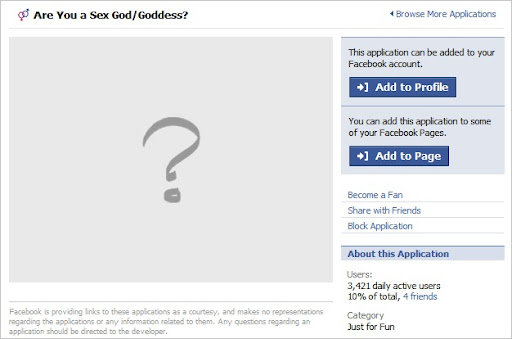
OK, in short we need to get to the applications information page. This is an overview page of the application in question and looks like the following:

image

You can access this page in a number of ways:

Accessing via your News Feed

Many of the crapware app's like to spam your news feed, here is such spam from my own news feed. As you can see, this application is called "Are You a Sex God/Goddess?". Well FB app, yes I am, but I don't need you to tell me, I will delete thee!

image

Browsing the Applications

By clicking the "Applications" link in you left sidebar, you can access the applications you have already added, but also "Browse More Applications".

image image

You can then of course search for the offending app - However, the search query I typed "Sex God" should have found the application above, but didn't?:

image

Invites

Of course, you can also access the page via an invite sent to you from a friend. I don't have any at the time of writing (been on a major blocking spree so many of them are not coming through now) so I have no screen grabs - sorry!

Blocking the App

Once you are at the application info page, it is simply a case of clicking the "Block Application" link:

image

NOTE: I have seen some applications that have changed the text of this (such as "Block Are You a Sex God/Goddess").

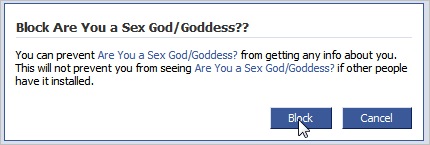
You will then receive a confirmation prompt:

image

Of course, clicking "Block" will block the application. This will stop you from receiving future invites and spam on your news feed. Hooray!

Unblocking an App

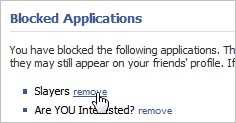
If you make a boo-boo and decide you really do want to find out what this application says about you being a sex god/goddess (or whatever) then you can unblock it via the "Privacy" > "Applications" > "Other Applications" > "Remove" Link.

image  image  image image

I hope this makes your Facebook-ing experience more enjoyable, it has for me! =)

Technorati Tags: , , ,

Thursday, 24 January 2008

Facebook - Stem the Surge of Crapware!

I have to say, I REALLY like Facebook (FB). I think there is a lot of great stuff already there, and they actually seem to be quite user-driven. Most of the new features seem to go down well (some, not so much!). But I think it has a nice clean layout, there's stupid "pimp my profile" crap going on, and it functions well.

They also have a great set of API's that make it easy for developers to build FB-centric applications. Which is great, I am currently working on a FB pet project myself. However, this has also caused a HUGE influx of crapware. Every day I have about 20+ requests to be a zombie, race people, kiss people, have a food fight and lots of other rubbish that I am not interested in.

So I sent an email to FB support asking if/how I can block all the invites. And I received the following response:

Hi Rob,

Unfortunately, the functionality you are requesting is not currently
available. We will keep your suggestion in mind as we continue to improve
the site.

To block an application, click the "Applications" link in your
left-hand menu. You'll be taken to the Application Directory.

From the Application Directory, find the application you wish to block,
and click on the picture for the application to see its About page. On
the About page you will have the option to "Block this Application" on
the right side of the screen.

Blocking an application will prevent you from receiving invites to add
this application. It will also disable the application from using your
information. This means your friends will no longer be able to
communicate with you using this application. Finally, it will prevent the
application from publishing stories in your News Feed.

Sorry for any inconvenience. Let me know if you have any further
questions.

Thanks for contacting Facebook,

[Name Removed]
User Operations
Facebook

So, while I do find it a tad annoying that there is no global kill-switch for this thing, with 20+ invites a day I will have all the damn things blocked soon! =D


The good news is is that blocked applications don't pollute your actual applications list either, so overall, I don't think its a bad job done by the FB guys!


2008 Off to a Great Start!

Well, looks like I lied in my last post, I haven't been incredibly active on this blog since then, and I said I would - apologies for that.

So What Have I Been Doing?

Well, I have been studying hard as I am sick of having this first MCP (70-316) hanging over my head, I can write C# code, and know pretty much everything I need to know, but there are a couple of areas that are stopping me passing the exam, so I just need to keep working on it until it gets into my thick skull!

AWESOME NEWS!

Also, great news is, I have a new job! I have finally managed to get myself a position where I will be working with:

  • .NET 2.0
  • ASP.NET
  • A Team of Software Engineers (Who seem to really know their stuff!)

I am itching to get going, but currently working out my notice period with my current employer (which is kinda frustrating!).

I really feel this new job will accelerate my learning as well as my career as I will actually be working with the tools and technologies used in the business world and not crappy VBA! So looking forward to getting started and keeping you guys posted as to my thoughts and what-have-you!

Technorati Tags: , , , ,

Monday, 3 December 2007

Excellent Tool List from Scott Hanselman

I had a post come up on Google Reader the other day advising me to check out an updated Tool List from Scott Hanselman. I am glad I did, I added another couple to by "Tool Box" (ha). You do not have to be a developer, maybe just someone who uses their computer a lot!

It was nice to see that a few of the tools I have picked up of my own accord in my own "quest for the right stuff" appear on his list (Paint.NET, FoxIt Reader and Daemon Tools to name a few).

I definitely recommend checking out the list, its pretty comprehensive and their is bound to be something you might pick up. One thing I was surprised to find on there was DarkRoom - interesting app, and something I have never really thought of before! There has been so many times where I have wanted to just write. This app is ideal, you get a blank screen and a cursor, that's it! No messy desktop, toolbar's or any other crap. Just a cursor. Excellent!

So thank you for this excellent list Scott! Appreciated.

Saturday, 1 December 2007

It's Been A While..

Well hello there all!

Yes, it has indeed been a long time since my last post. I have been absolutely swamped with all the study and work! Good news is I am finally starting to reap the benefits of all my hard work, the project at work is coming together quite nicely (still a stiff deadline to meet before the year is out though!) and my exam prep for 70-271 is coming on well.

It sucks to have been out of touch with everything else of late, there's been a several big bits of news in the geeksphere which I have missed (I have not been up to date on my RSS reader either!) so hopefully I can review some of these also..

So just thought I would pop some words together to let you know content on this blog should be picking up again!