Imports from Live Blog

Showing posts with label facebook. Show all posts

Friday, 25 January 2008

Blocking Facebook App's (Al La "Crapware")

OK, following my post on "Stemming the Surge of Crapware", I have had a few people ask me to clarify the application-blocking process, so I thought I would post some instructions here.

Finding the Application Info Page

OK, in short we need to get to the applications information page. This is an overview page of the application in question and looks like the following:
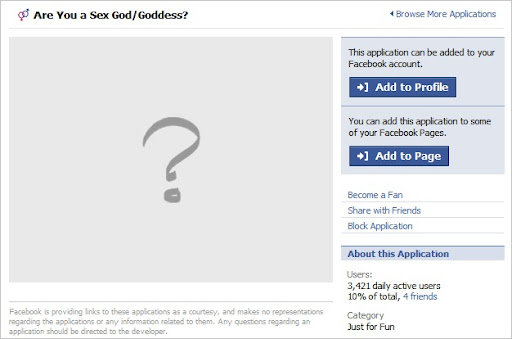
image

You can access this page in a number of ways:

Accessing via your News Feed

Many of the crapware app's like to spam your news feed, here is such spam from my own news feed. As you can see, this application is called "Are You a Sex God/Goddess?". Well FB app, yes I am, but I don't need you to tell me, I will delete thee!

image

Browsing the Applications

By clicking the "Applications" link in you left sidebar, you can access the applications you have already added, but also "Browse More Applications".

image image

You can then of course search for the offending app - However, the search query I typed "Sex God" should have found the application above, but didn't?:

image

Invites

Of course, you can also access the page via an invite sent to you from a friend. I don't have any at the time of writing (been on a major blocking spree so many of them are not coming through now) so I have no screen grabs - sorry!

Blocking the App

Once you are at the application info page, it is simply a case of clicking the "Block Application" link:

image

NOTE: I have seen some applications that have changed the text of this (such as "Block Are You a Sex God/Goddess").

You will then receive a confirmation prompt:
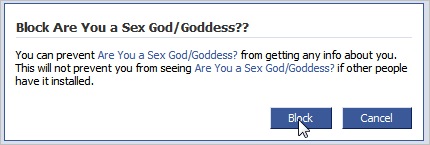
image

Of course, clicking "Block" will block the application. This will stop you from receiving future invites and spam on your news feed. Hooray!

Unblocking an App

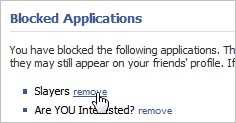
If you make a boo-boo and decide you really do want to find out what this application says about you being a sex god/goddess (or whatever) then you can unblock it via the "Privacy" > "Applications" > "Other Applications" > "Remove" Link.
image  image  image image

I hope this makes your Facebook-ing experience more enjoyable, it has for me! =)

Technorati Tags: , , ,

Thursday, 24 January 2008

Facebook - Stem the Surge of Crapware!

I have to say, I REALLY like Facebook (FB). I think there is a lot of great stuff already there, and they actually seem to be quite user-driven. Most of the new features seem to go down well (some, not so much!). But I think it has a nice clean layout, there's stupid "pimp my profile" crap going on, and it functions well.

They also have a great set of API's that make it easy for developers to build FB-centric applications. Which is great, I am currently working on a FB pet project myself. However, this has also caused a HUGE influx of crapware. Every day I have about 20+ requests to be a zombie, race people, kiss people, have a food fight and lots of other rubbish that I am not interested in.

So I sent an email to FB support asking if/how I can block all the invites. And I received the following response:

Hi Rob,

Unfortunately, the functionality you are requesting is not currently
available. We will keep your suggestion in mind as we continue to improve
the site.

To block an application, click the "Applications" link in your
left-hand menu. You'll be taken to the Application Directory.

From the Application Directory, find the application you wish to block,
and click on the picture for the application to see its About page. On
the About page you will have the option to "Block this Application" on
the right side of the screen.

Blocking an application will prevent you from receiving invites to add
this application. It will also disable the application from using your
information. This means your friends will no longer be able to
communicate with you using this application. Finally, it will prevent the
application from publishing stories in your News Feed.

Sorry for any inconvenience. Let me know if you have any further
questions.

Thanks for contacting Facebook,

[Name Removed]
User Operations
Facebook

So, while I do find it a tad annoying that there is no global kill-switch for this thing, with 20+ invites a day I will have all the damn things blocked soon! =D


The good news is is that blocked applications don't pollute your actual applications list either, so overall, I don't think its a bad job done by the FB guys!